


YouTube Shorts on mobile
THE PROBLEM
Later Social’s mobile app does not currently support publishing to YouTube Shorts. While many users rely on the mobile app as their primary tool for scheduling and managing social content, they are unable to publish Shorts from mobile. This is a gap in current platform coverage, and prevents users from being able to fully manage their short-form video strategy within Later.
SOLUTION
Designed YouTube Shorts publishing into the mobile app, enabling creators to publish short-form content seamlessly within the app.
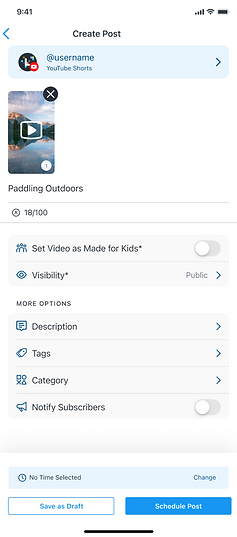
Users can now schedule and publish YouTube Shorts directly from Later’s mobile app. The design flow allows users to upload Shorts up to three minutes long, and includes essential publishing controls such as visibility, privacy, and tags—making it easy for users to manage short-form video alongside all of their other social content.
IMPACT
• ~37% increase in scheduling to YouTube

THE PROCESS
I began with exploratory ideation to understand how YouTube Shorts publishing could fit naturally within Later’s existing mobile scheduling experience. Because the app already supported platforms like Instagram and Facebook, a key challenge was introducing YouTube-specific requirements without disrupting users’ established mental models.
YouTube Shorts introduced additional complexity compared to other supported platforms. Unlike existing scheduling flows, YouTube required more granular inputs—such as title, audience, and tags—as well as a different set of required fields. The design approach needed to accommodate this increased specificity while still feeling familiar, cohesive, and lightweight within the broader scheduling experience.

IDEATION & EXPLORATION
To account for platform-specific needs, I explored and ideated on five core areas where YouTube Shorts differed from other platforms supported in the Later Social app.
1: Additional Fields Placement
Unlike the other platforms on the app, YouTube required 2 additional fields: Audience, and Visibility

2: Required Fields UI
I ideated on several UI patterns to clearly surface required fields, while maintaining visual consistency with similar existing UI on the app.

3: Adding a Title field
Unlike other platforms supported in the app, YouTube required a title field. I explored ways to integrate this field without disrupting the current user experience, or adding a whole new design pattern.

4: Audience
Audience selection is a posting requirement unique for YouTube, & I explored design solutions for adding this field.

5: Tags

FINAL SOLUTION
YouTube Shorts publishing was successfully introduced into Later’s mobile app, expanding platform support while maintaining a cohesive scheduling experience. The final designs integrated YouTube-specific fields (such as title, audience, and tags) while using UI patterns that felt familiar to users and aligned with existing workflows.
Design decisions were guided by a balance between delivering the best possible user experience and leveraging existing components within the app. Where possible, I adapted and extended current UI elements rather than introducing entirely new patterns, reducing cognitive load for users and minimizing development complexity. This approach allowed us to meet YouTube’s unique publishing requirements while preserving consistency, efficiency, and scalability across the product.


IMPACT
Introducing YouTube Shorts on mobile increased usage significantly. Within its first 4 months, the number of scheduled posts on YouTube went from 9,746 to 13,322, an approximately ~37% increase.

Adding YouTube as a supported platform expanded the mobile app’s functionality, enabling users to manage and schedule content across one more major channel, and reinforcing Later Social as a comprehensive solution for all their social media scheduling needs.
BONUS
I presented this work during our bi-weekly sprint demos to walk stakeholders, other designers, developers, QA, and leadership through the design process, key considerations, and trade-offs.
This presentation was key for helping teams understand how the designs addressed both user needs and business outcomes, build design literacy across the company, and highlight the iterative nature of the design process by making work visible prior to launch.

