


Smarter Scheduling for Social Media Managers
THE PROBLEM
User Problem
Scheduling content at Later Social is no longer just about choosing a time to post—it’s about ensuring relevance. Research on Later Media's customer behaviour shows that Later has evolved beyond being a simple posting tool; users now look to Later as a partner to help them decide what to post, when, and why. To support this shift, we need to design a smarter scheduling experience that integrates user's insights from social listening with our existing scheduling functionality.
Business Problem
On the business side, we were looking to:
1: Increase conversions by encouraging free users to upgrade to paid plans, and motivate existing paid users to move to higher-tier plans.
2: Draw visibility to our Future Insights Social Listening page.
SOLUTION
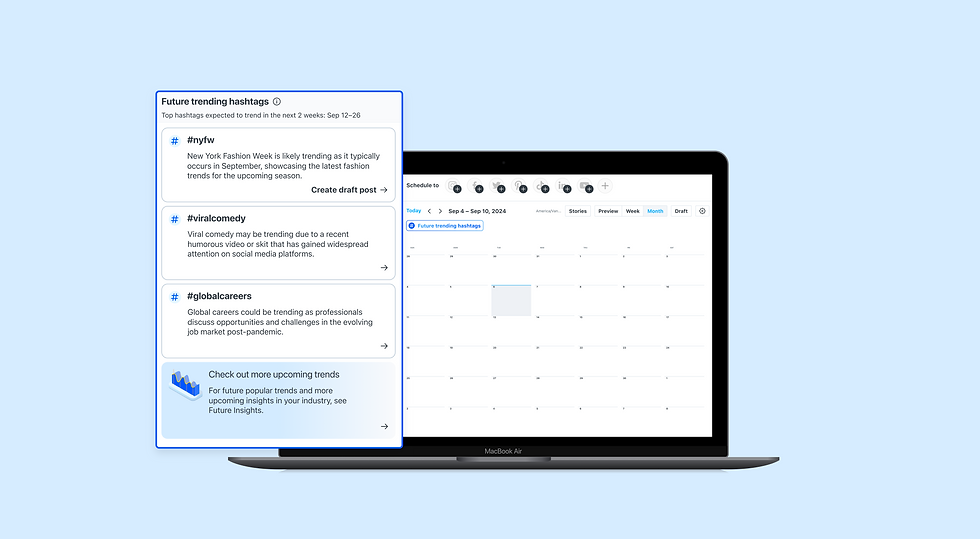
Enhanced content scheduling with future trending hashtag insights.
Within their calendar view on Later Social, users can view which hashtags are projected to trend over the next two weeks, and schedule posts around these trending hashtags.
From this view, three upgrade flows are provided—tailored to users’ current plans—to encourage conversion to higher-tier plans.
This solution leverages Later Social's existing AI tools to encourage insight-driven scheduling on higher-tier plans. As well, leveraging existing tools ensure implementation can be completed in a timely manner.

IMPACT
• 311 plan upgrades within the first month.
• 467% increase in visits to the Future Insights Social Listening page.
RESEARCH & TESTING
Initially, this project was born from a different assumption altogether: providing scheduling alone on Later Social was not enough, and that we needed to allow users to upload their content calendars (a tool that schedules and organizes content, typically including publish dates, social media platforms, media, notes, etc) onto Later Social.
In order to test this assumption, I did preliminary research into the value of content calendars, what content calendars consisted of, and how users were formatting their content calendars.
.png)

I then created 3 flows which were tested by our User Research team with customers.
.png)
From user testing, some data gathered was:
-
This idea is too specific
-
There is a huge range of how people set up their content calendars, and it's not feasible to allow them to upload completely customizable documents
"When scheduling posts, I will just copy and paste information from my content calendar file into its corresponding fields on Later Social. If I have to spend more time uploading my content calendar than copy and pasting my data, then this would not be useful to me."
PIVOTING BASED ON INSIGHTS
Main takeaways to note from user research:
Smart Scheduling in in the right direction:
-
Users want data to back up their current scheduling decisions. This data should help guide their content strategy, and not be time-consuming to digest.
Users are looking for more refined tools, to help them with scheduling
-
This tool should help them refine their content strategy.
IDEATION & EXPLORATION
How can we help users utilize relevant industry data to inform their content strategies?
Due to this pivot and shift in priorities, I redesigned the flows into a future trending hashtag feature on a user's calendar, which allowed users to plan and schedule posts strategically around future trending hashtags. These future trending hashtags are pulled from our existing Social Listening page on Later Social.
I then ran 5 design options for scheduling with future trending hashtags on a user's calendar past my design team, the services team, my development team, and my PM.
Option 5, the final iteration, had the optimal balance of clarity, consistency, and intuitiveness. Feedback from the services, design, and development teams, as well as my PM, recognized Option 5 for its simplicity and readability compared to previous options.
Option 1:
• Calendar based view
.png)
Option 2:
• Minimal calendar based view
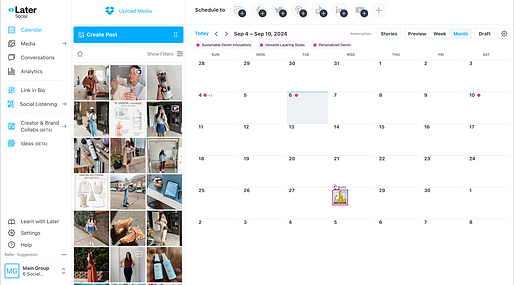

Ultimately I chose not to go with any of the calendar based views, because of 2 reasons:
1. The calendar could already get cluttered with upcoming scheduled posts and notes. Adding a date specific view for future trending hashtags would clutter it even more.
2. Through conversation with devs and the data team, I learned the future trends were always predicted for 2 weeks from the user's current date, meaning they would always fall on the same 14 days, so it didn't make sense to make these dates specific on the calendar.
Option 3:
• Popover option 1: Schedule button

I chose to not go with this option, as I thought the UI could be cleaner with a more contextual, hover state "Schedule" button.
Option 4:
• Popover option 2: Expanding/contracting view
I chose to not go with this option, as the way the whole popover expanded/contracted with the expansion/contraction of each card was a bit jarring.

Option 5:
• Popover option 3: Hover actions

PIVOT: On the final round of iterations, I decided to change the action from scheduling a post to creating a draft post, as that seemed more in line with user behaviour.
The UI/UX for this option was the smoothest, with the "Create draft post" appearing contextually; as a user hovers over each hashtag. This option also solved the issue of Option 5's jarring expansion/contraction of the card.
HANDLING COMPLEXITY
Another key challenge was handling the business problem: increasing conversions both from free plans to paid plans, and from lower-tier plans to higher-tier paid plans (Growth and up). At Later, the pricing plan structure was: Free, Starter, Growth, and Scale.
In terms of pricing out this functionality, only users on the Growth plan and above would be able to access this feature, making this a more premium feature.
To optimize conversion opportunities and support plan upgrades, I created 3 upgrade flows:
-
Granting Free/Starter users time limited access to this functionality
-
From Free/Starter --> Growth
-
From Growth --> Scale
1: Granting Free/Starter users time limited access to this functionality
For users on both the Free plan and the Starter plan (our lowest-tier paid plan), we introduced a new trial flow that provided 24-hour, time-limited access to this functionality. After the 24-hour trial period ended, users who attempted to access the feature again would be shown an upgrade modal. This approach offered a low-friction way to expose users to premium functionality, allowing them to experience its value firsthand before committing to an upgrade.
This was the first time we offered a time-limited trial for a higher-tier feature, so I designed the upgrade flows to be simple, scalable, and adaptable for future premium functionalities.
24 Hour Trial Access Flow


2: From Free/Starter --> Growth
I wanted to give Free and Starter plan users a contextual way to upgrade to the Growth plan while actively engaging with this functionality. To achieve this, I designed an integrated upgrade section within the functionality—always present, but subtle enough not to disrupt task flow.
This approach ensured continuous visibility of the upgrade opportunity without relying on intrusive modals, aligning with best practices for seamless, user-centered conversion design
From Free/Starter --> Growth

3: Growth --> Scale
Growth plan users had access to the future trending hashtag functionality, but not to the full Social Listening feature—the source of these insights—and Social Listening was only available on the higher-tier Scale plan. To bridge this gap and highlight the added value of upgrading, I designed an integrated upgrade flow for Growth users to encourage conversions to the Scale plan.
From Growth -->Scale

Bonus: Scale --> Social Listening
Scale plan users had full access to both the future trending hashtag functionality, and to the Future Insights page within Later's Social Listening feature, which was where this future hashtag data originated from. I wanted to surface the value of the Future Insights page to Scale plan users, as Future Insights offered more information on upcoming future trends, and more industry specific upcoming hashtags.
To do this, I designed a flow on the future trending hashtag functionality that linked directly to the Future Insights page—creating a more connected and discoverable product experience.
Scale --> Social Listening

FINAL SOLUTION
The final design of the future trending hashtag feature on a user’s calendar allows users to see which hashtags are projected to trend over the next two weeks and schedule draft posts around them.
Users can click on the "Future trending hashtags" button to view a list of the top 3 trending hashtags. Hovering over a hashtag reveals a “Create a draft post” button, which opens a new draft post for the user with the trending hashtag pre-populated in the caption.
This feature allows users to craft content strategy around future trends, and enables smarter scheduling for customers—a behavioural shift observed in our customers since the rise of AI tools. As we evolve our functionality, this marks one of many first steps in shifting our product from purely scheduling posts, to providing data-informed scheduling, helping users leverage industry-relevant insights to achieve their content goals


Free/Starter Plans Upgrade Flow

Growth Plan Upgrade Flow
IMPACT
This feature proved to be very successful. In its first month, we saw 311 plan upgrades.
.png)
.png)
Also in its first month, we saw a 467% increase in page visits to the Future Insights Social Listening page.
Additionally, we heard from customers that seeing upcoming future trending hashtags was insightful for them, and helped with scheduling content around relevant hashtags. This feature is now surfaced on sales calls and is used as a talking point to provide value to future prospects.